

Local SEO Pricing Guide: Real Costs, Service Models, And ROI Benchmarks
BlogLocal SEO Pricing Guide: Real Costs, Service Models, And ROI Benchmarks In 2026, local search engine optimization campaigns for single-location businesses typically cost between 500 USD and 3,000 USD per month, with standard agency retainers averaging 1,557 USD monthly. Multi-location brands and service providers operating in dense urban markets invest between 3,500 USD and 10,000 USD per month to capture dominant map pack rankings. We created this clear pricing breakdown to help business owners evaluate agency quotes, understand core technical deliverables, and measure real commercial return on investment. If you want direct advice on structuring your marketing budget, reach out to Sitelinx SEO Agency at (213) 510-8355. Core Pillars Driving Local Search Performance Achieving top ranking positions on Google requires an integrated approach across site architecture, geographical relevance, and online customer sentiment. According to official documentation in the Google Business Profile Help Center, local algorithms evaluate three primary factors: relevance, distance, and prominence. Translating those three algorithmic pillars into operational daily tasks shapes campaign scope and pricing. Modern local campaign deliverables include: Google Business Profile Management: Selecting accurate primary categories, adding geotagged media, monitoring spam edits, and auditing secondary categories to maximize Google Maps exposure. On-Page Technical SEO: Building location landing pages, writing geo-targeted title tags, fixing core web vitals, and deploying LocalBusiness JSON-LD structured data. Review Acquisition and Velocity Workflows: Setting up automated outreach channels to collect customer reviews. Consistent review velocity directly improves map pack visibility. Citation Clean-Up and Aggregator Syncing: Aligning business name, address, and phone number (NAP) data across aggregators like Data Axle and Neustar Localeze to eliminate search data confusion. Generative AI Search Grounding: Structuring site answers and entity data so conversational AI platforms and search overviews accurately cite your business details. Evaluating Local SEO Pricing Models Digital agencies and consultants structure their billing into three standard service models. Choosing the right structure depends on your internal technical resources, project timeline, and growth goals. Industry guidance from the U.S. Small Business Administration notes that aligning marketing investments with clear performance metrics ensures sustainable growth. Monthly Retainer Model The monthly retainer is the primary framework for ongoing search optimization, accounting for roughly 78 percent of agency client contracts. Retainers provide predictable monthly costs in exchange for continuous technical updates, review strategies, local link outreach, and ranking reports. Single-location retainers range from 750 USD to 3,500 USD per month, while multi-location brands scale beyond 5,000 USD monthly. Hourly Consulting Model Hourly billing works best for standalone technical audits, strategy sessions, or internal team training. Senior agency strategists bill between 100 USD and 250 USD per hour for customized advice. While hourly contracts offer flexibility, they lack the ongoing execution required to build market authority in competitive sectors. Project-Based Pricing Model Project-based engagements suit companies that need targeted fixes without recurring commitments. Common projects include profile penalty reinstatements, site migrations, citation audits, or initial schema installations. Project fees fall between 1,000 USD and 6,000 USD depending on overall scope. Local SEO Cost Comparison Matrix The table below outlines standard investment tiers, typical monthly costs, deliverables, target business types, and expected ROI timelines across the search market. Investment Tier Typical Monthly Cost (USD) Target Business Scope Primary Deliverables Included Expected ROI Window Low-Cost Maintenance 300 to 750 USD Single location, low-competition niche services Basic profile setup, directory citation lock, quarterly performance reporting 6 to 9 Months Mid-Tier Competitive Growth 1,500 to 3,500 USD Single to dual location, competitive metro areas (legal, dental, HVAC) Full profile management, local schema, review campaigns, geo-content, technical SEO 3 to 6 Months Multi-Location Expansion 3,500 to 8,000 USD Regional brands, 3 to 15 physical branches or service zones Multi-branch profile management, location landing hubs, aggregator sync, link building 3 to 6 Months Enterprise & Franchise 8,000 to 20,000+ USD Regional and national franchises with 15+ locations Custom API integrations, central review governance, AI entity grounding, scale link outreach 2 to 4 Months For broad educational background on search indexing and site optimization, consult the overview on Wikipedia Search Engine Optimization Overview. Key Factors Influencing Local SEO Investment Campaign costs reflect technical labor requirements. When we evaluate projects for clients, four major variables drive necessary effort and campaign pricing: Market Density and Competition: Securing organic search positioning for a personal injury attorney in Los Angeles requires vastly more effort than ranking a boutique service provider in a small suburban township. High cost-per-click industries demand heavy content creation and aggressive backlink outreach. Location Count and Service Radius: Managing multiple storefronts multiplies the required labor for profiles, location hub pages, schema markup, and review tracking. Service-area businesses covering adjacent counties must publish distinct location pages for every targeted zip code. Legacy Technical Debt and Domain Health: Websites with past manual spam penalties, duplicate pages, or mismatched NAP records require deep technical remediation before growth strategies show results. Target Commercial Intent: Capturing high-intent transactional search queries requires deeper keyword modeling, structured schema validation, and high-authority local citations. Real-World Engineering Challenges and Technical Resolutions To demonstrate how technical execution connects directly with investment, we share two distinct client scenarios managed by our agency. Resolving Hard Map Suspensions and Directory Mismatches A multi-location medical practice in Southern California relocated two branch clinics. Internal staff updated the address on their Google Business Profiles without syncing third-party aggregator directories. The data mismatch triggered an immediate hard suspension on Google Maps, erasing the business from local search results during peak customer acquisition season. Our team completed a full citation audit, locking core records across Data Axle and Neustar. We compiled lease agreements, state business licenses, and utility records to submit a formal reinstatement appeal directly to Google. Within 11 business days, Google reinstated both profiles, restoring top-three map rankings and preserving historic customer reviews. Eliminating Keyword Cannibalization for Multi-Branch Services A multi-county plumbing and HVAC business suffered a severe organic traffic drop after launching individual city landing pages. The pages used templated content where only city names were swapped. Google flagged the domain for duplicate content, triggering keyword cannibalization where local pages

Ultimate Guide To Changing Your Google Business Profile Picture For Better Engagement
BlogGoogle Business Profile Photo Optimization: Complete Technical & Strategy Guide Visual assets serve as the primary digital storefront for local enterprises appearing on Google Search and Google Maps. When high-intent local consumers search for products or services, Google Business Profile (GBP) imagery acts as an immediate trust signal. Listings with optimized, high-quality photography consistently experience 42 percent more requests for driving directions and 35 percent higher website click-through rates than incomplete or neglected profiles. In our experience managing local search strategies for multi-location enterprises and regional brands, we frequently find that poorly proportioned logos, outdated storefront photos, or incorrect aspect ratios directly reduce conversion rates. Furthermore, Google relies heavily on automated vision processing algorithms, which often cause recently uploaded media to become stuck in pending review or face unexpected rejections. This guide outlines the technical specifications, operational workflows, AI moderation standards, and advanced troubleshooting techniques required to maximize the performance of your Google Business Profile imagery. Technical Specifications for Google Business Profile Visual Assets Adhering strictly to Google photo dimensions prevents unwanted cropping, distortion, or server compression across desktop Knowledge Panels and mobile Maps viewports. While Google enforces minimal lower thresholds, following recommended resolutions ensures clear asset rendering across high-density retina displays. Visual Asset Requirements Matrix Asset Category Recommended Resolution Minimum Resolution Aspect Ratio Maximum File Size Supported Formats Profile Logo 720 x 720 pixels 250 x 250 pixels 1:1 (Square) 5 MB JPG, PNG Cover Photo 1024 x 576 pixels 480 x 270 pixels 16:9 (Landscape) 5 MB JPG, PNG Business Photos (Interior / Exterior) 720 x 720 pixels 250 x 250 pixels 1:1 or 4:3 5 MB JPG, PNG Profile Post Media 1200 x 900 pixels 250 x 250 pixels 4:3 (Landscape) 5 MB JPG, PNG Video Assets 1280 x 720 pixels (720p+) 720 x 720 pixels 16:9 or 1:1 75 MB MP4, MOV (Up to 30 sec) Strategic Standards for High-Converting Visual Assets Compression Parameters: We recommend maintaining file sizes between 200 KB and 2 MB to balance high visual fidelity with rapid rendering speeds. Lighting Protocols: Rely on clear ambient or natural daylight. Avoid extreme direct flash or heavy filters that obscure structural features of your physical location. Color Space Standards: Save all export files using the standard sRGB color spectrum to prevent improper color shifting across mobile displays. Overlay Restrictions: Keep digital overlays, watermarks, and text overlays to a minimum. Visuals containing dominant promotional text regularly trigger automated rejection filters. Step-by-Step Workflows for Updating Profile Media Google has integrated primary listing management tools directly into standard Google Search results and the Google Maps application interface. Managing Photos via Google Search Desktop Interface Log into the specific Google Account holding owner or manager access for the listing. Search for your precise business name or type the command query my business into the search bar. Locate the In-Search Profile Management dashboard above the organic results. Click the Add photo icon inside the management panel. Select the targeted media type: Logo, Cover photo, or Photo (for interior, exterior, team, or product assets). Upload the prepared visual asset and verify crop boundaries before finalizing. Updating Media via Mobile Google Maps Application Open the Google Maps app on your mobile device using the authenticated management account. Tap the Business profile icon located on the bottom navigation bar or account menu. Select Photos within the primary management portal. Select the addition icon (+) to select files from local storage or capture immediate photos. Tag the media with relevant category labels to assist Google in proper asset categorization. Google Vision AI and Algorithmic Media Moderation Every uploaded visual asset undergoes automated evaluation by Google’s visual recognition network, including the Google Cloud Vision API. Understanding how these machine learning systems classify visual content helps prevent unexpected media suppression. Key Moderation Signals Scanned by Google Vision AI Optical Character Recognition (OCR): Scans images for embedded text. Images with excessive promotional text, phone numbers, or banner overlays are flagged as policy violations. SafeSearch Classification: Evaluates imagery across adult, violent, medical, and hate speech parameters to ensure brand safety standards. Duplicate and Stock Asset Detection: Cross-references global image registries for identical digital fingerprints. Stock photography or duplicate uploads across multiple listings trigger rapid suppression. Location and Visual Context: Validates visual cues in uploaded photos against historical category expectations and surrounding geographic features. Complex Visual Optimization Challenges and Enterprise Solutions In our work optimizing enterprise local listings, standard management workflows sometimes fail due to technical glitches or aggressive algorithm moderation. Below are real-world technical issues we encountered and successfully resolved for our clients. Case Study 1: Resolving the Cover Photo Auto-Override Glitch A multi-location medical organization in California faced an issue where Google consistently replaced their custom exterior cover photo with an unappealing, low-quality hallway image uploaded by a customer. Despite uploading the corporate cover photo repeatedly via the dashboard, Google’s algorithm continued favoring the user-submitted file due to high consumer interaction metrics on that image. Resolution Steps: We removed the old cover asset completely and uploaded a fresh 16:9 landscape file measuring 1024 x 576 pixels, positioning key architectural focal points inside a centered safe region. We ensured embedded EXIF data matched the precise geographic coordinates of the physical facility. We submitted five new verified high-resolution exterior assets classified explicitly under the Exterior category via the Search dashboard. Within 72 hours, Google’s visual processing algorithm updated the entity model and assigned our preferred asset as the primary cover photo. Case Study 2: Breaking the Pending and Rejection Moderation Loop A boutique retail client attempted to publish new product imagery featuring subtle brand website URLs placed in the bottom corner of each photo. Every upload triggered an immediate Not Approved status, while un-watermarked secondary uploads remained stuck in a Pending state indefinitely. Resolution Steps: We processed the rejected files through visual inspection tools to confirm that Google’s OCR engine flagged the URL text as promotional overlay policy violations. We re-shot the product inventory against clean backdrops using balanced daylighting with zero added text overlays. We cleared

Unlocking SEO Success: How Your CMS Could Be Hurting Your Rankings
BlogLet’s get real for a second. How many times have you poured hours into optimizing content, tweaking meta tags, and chasing backlinks, only to realize your CMS (Content Management System) is basically working against you? We’ve been there too. If your CMS isn’t built with SEO in mind, you’re stuck playing a rigged game. But hey, no judgment—we’re here to geek out about SEO-friendly CMS platforms and how they can turn your site from invisible to irresistible.
Understanding the Shift: Are GBP Reviews Replacing LSA Reviews?
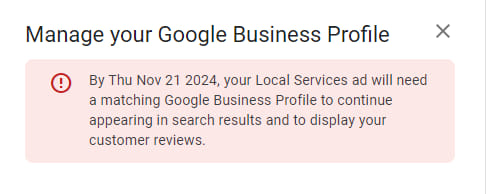
BlogGoogle has fully consolidated LSA customer reviews into Google Business Profiles (GBP). The separate LSA review system was officially retired on July 11, 2025. Since that date, all reviews for businesses using Local Services Ads are managed exclusively through GBP. The old LSA review link no longer works, and existing LSA reviews have been migrated (or removed) after passing through GBP moderation policies. This change means your GBP rating, review count, and review recency now directly determine your LSA ad rank, visibility, and lead volume. A well-optimized GBP is no longer optional — it is the engine that powers your Local Services Ads performance. What Actually Happened: The Timeline Date Event November 2024 A linked, verified GBP becomes mandatory to run LSAs July 11, 2025 LSA reviews fully managed by GBP; separate LSA review system ends Early 2025 Existing LSA reviews begin transitioning to GBP October 20, 2025 Google Guaranteed and Google Screened badges retire; single “Google Verified” blue checkmark launches January 2026 Google increases algorithmic weight on review recency and velocity February 2026 Minimum review requirement for LSA activation removed; businesses can launch LSAs with zero reviews Why Google Made This Change The old dual-review system created confusion and abuse: Fragmented Trust Signals: Customers saw one set of reviews on LSAs and another on GBP, with no way to reconcile them. Review Spam: Some advertisers purchased fake LSA reviews in bulk to manipulate ad rank. Low LSA Review Volume: Very few customers left reviews directly through the LSA platform, making LSA-only reviews a weak trust signal. By consolidating everything under GBP, Google: Applies its established Maps review policies (which are stricter and better enforced). Creates one authoritative reputation score per business. Simplifies review management for business owners. What This Means for Your Business Your GBP Rating Is Your LSA Rating The star rating and review count displayed on your Local Services Ads are now pulled directly from your GBP. There is no separate LSA rating anymore. Reviews Are No Longer Required to Launch — But Still Required to Win Google removed the minimum review requirement for LSA activation in February 2026. A brand-new business can launch LSAs with zero reviews. However: Review count, rating, and recency remain dominant LSA ranking signals. A business with zero reviews will struggle to appear in the top LSA carousel against competitors with strong GBP profiles. Review velocity — the rate at which you receive fresh reviews — has increased in algorithmic weight since January 2026. The Google Verified Badge Replaced Google Guaranteed As of October 20, 2025, the green “Google Guaranteed” and “Google Screened” badges were retired. One unified blue “Google Verified” checkmark now appears on all eligible LSAs. This badge confirms verified licensing, insurance, and background checks — but it does not include the former $2,000 money-back guarantee. Action Plan: What You Must Do Now 1. Audit and Fully Optimize Your Google Business Profile A suspended, incomplete, or unverified GBP will prevent your LSA ads from running entirely. Immediate Optimization Checklist: Verify your GBP is claimed, verified, and publicly visible Complete every profile field: business description, services, hours, service areas, attributes Upload high-quality, real job photos weekly (not stock images) Ensure Name, Address, and Phone number (NAP) match across all online listings Confirm your GBP review link is correctly set in your LSA dashboard Post weekly updates, offers, or events to signal activity to Google 2. Replace All Old LSA Review Links Stop using any legacy LSA-specific review links immediately — they no longer function. Generate your GBP review short link from the “Ask for reviews” section of your GBP dashboard. Update all customer touchpoints: website, email signatures, SMS templates, invoices, CRM software, and printed materials. 3. Train Your Team on the New Reality Every employee who interacts with customers must understand that GBP reviews now fuel LSA performance. Provide scripts for requesting reviews at the moment of service completion. Ensure phone handlers know the 30-second billing rule: any call lasting 30 seconds or longer is charged as a lead, regardless of outcome. LSA Ranking Factors in 2026: What Actually Matters Ranking Factor Impact Level Notes GBP star rating and review count Primary (highest impact) Pulled directly from your GBP; no separate LSA rating exists Review recency and velocity High — increased weight as of January 2026 Businesses with stale review profiles see sudden lead volume drops Lead responsiveness (missed calls tracked over 90 days) High Answer every call; missed calls directly hurt your rank GBP profile completeness and accuracy High Audit quarterly; inconsistent NAP damages visibility Business hours accuracy Moderate Update seasonally; incorrect hours erode trust signals Budget and bid settings Moderate Higher budgets can improve placement, but cannot compensate for a poor GBP Proximity to searcher Moderate Still a factor, but strong reviews can help overcome distance disadvantages Unresolved customer complaints Negative impact Can pause or penalize your ads Expired license or insurance Negative impact Can remove your Google Verified badge How to Build a GBP Review Strategy That Scales Timing: Ask Immediately After Service Completion The highest conversion window is when the customer is satisfied and the interaction is fresh — ideally within 24 hours of service completion. Multi-Channel Outreach Methods In-person request at the conclusion of the job SMS message with a direct link to your GBP review form Personalized email including the review link Review link embedded in invoices, receipts, and follow-up communications Respond to Every Review — Positive and Negative Google recently refreshed its guidance: replies must be helpful, human, and aligned with policy. A strong response strategy improves how customers perceive your business in Search and Maps. Thank positive reviewers sincerely; avoid generic copy-paste responses. Address negative reviews constructively — acknowledge the issue, offer a solution, and take the conversation offline when appropriate. Ethical Review Practices (Critical for 2026) Google has formalized stronger enforcement against fake and incentivized reviews, including profile restrictions and suspensions: Prohibited Practice Why It Matters Offering discounts, freebies, or gifts in exchange for reviews Violates Google policy; can trigger GBP suspension — which pauses your LSAs Review gating (selectively soliciting only happy

Combatting Fake Reviews: Google’s 2025 Business Profile Changes Explained
BlogGoogle’s New Business Profile Restrictions: Fake Reviews (And Why We’re All Gonna Be Okay) Let’s cut to the chase: fake reviews are the internet’s version of a bad toupee—obvious, awkward, and no one’s fooled. But here’s the kicker—Google’s finally tightening the screws on them. If you’re a business owner sweating over these new restrictions, take a deep breath. We’ve got your back. At Sitelinx Organic SEO Agency in Los Angeles, we’ve been knee-deep in Local SEO and Google Business Profile drama for years. Trust us, this isn’t the apocalypse—it’s an upgrade. So, why should you care? Because fake reviews aren’t just annoying; they’re toxic. They mess with your credibility, tank your rankings, and make customers side-eye your business like it’s a suspicious leftovers container. But hey, let’s not panic. Let’s strategize. Why Fake Reviews Are Everyone’s Problem (Yes, Even Yours) First off, let’s get real: fake reviews aren’t just a “big business” issue. Whether you’re a cozy coffee shop or a WordPress wizard offering SEO services, your Google Business reviews are your digital handshake. Google’s new restrictions? They’re like a bouncer at the club, kicking out the posers so the real stars can shine. Here’s what’s changing: Stricter verification: Google’s cracking down on reviews from suspicious accounts (read: profiles created yesterday with zero history). AI-powered detection: Algorithms now hunt for patterns like repetitive language or sudden review spikes. Faster removals: Flagged reviews get yanked quicker, but you still need to stay vigilant. Fun fact: A recent client of ours (a boutique bakery) had a competitor flood their profile with one-star “reviews” from accounts that only existed to trash them. Took us 48 hours to clean it up—and boost their rankings. Moral of the story? Fake reviews are a pain, but fixable. How to Adapt Without Losing Your Mind (or Your Rankings) Okay, let’s talk solutions. Google’s playing hardball, but we’re here to make sure your business doesn’t strike out. Step 1: Audit Your Existing Reviews Grab a coffee and comb through your Google Business reviews. Look for: Generic language (“Great service!”, “Terrible experience!”) with no specifics. Multiple reviews posted in a short timeframe. Accounts with no profile photos or activity. Pro tip: Use tools like ReviewTrackers or just hire an SEO specialist (hi, that’s us) to handle the dirty work. Step 2: Encourage Real Reviews Like Your Business Depends on It (Because It Does) The best defense against fake reviews? A flood of genuine ones. Here’s how: Ask politely: Add a review link to email signatures, receipts, or your website. Make it easy: Use QR codes on tables, counters, or invoices. Incentivize (ethically): Offer a small discount or entry into a giveaway—after they leave a review. FYI: Google’s guidelines forbid offering incentives for positive reviews, so keep it neutral. Why Local SEO Is Your New Best Friend Let’s get nerdy for a sec. Local SEO isn’t just about keywords—it’s about building trust. Google’s algorithm now prioritizes businesses with: Consistent NAP (Name, Address, Phone) across directories. High-quality photos and updated hours. Legit reviews that reflect real customer experiences. At Sitelinx, we’ve seen businesses jump 3+ spots in local rankings just by cleaning up their profiles and optimizing for these factors. And guess what? It’s cheaper than Google Ads. When to Call Reinforcements (Hint: We’re Really Good at This) Look, we get it. Between website management, technical SEO services, and pretending to understand TikTok trends, you’ve got enough on your plate. That’s where an SEO agency like ours comes in. Here’s what the best SEO companies for small business can do for you: Monitor reviews 24/7: We’ll flag fakes faster than you can say “algorithm update.” Optimize your WordPress SEO: Because nobody wants a slow, clunky site in 2024. Fix technical nightmares: Broken links? Mobile-unfriendly design? Consider it handled. Rhetorical question: Why stress over Google’s ever-changing rules when you could be sipping margaritas while we do the heavy lifting? 3 Burning Questions About Fake Reviews (Answered Without the Jargon) “How do I prove a review is fake?” Look for vagueness, duplicate content, or a reviewer with no history. Screenshot everything and report it via Google’s dashboard. “Will Google penalize my business if competitors leave fake reviews?” Only if you’re the one posting them. Google’s smarter now—they’ll target the culprit, not the victim. “Can I just delete bad reviews?” Only if they violate policies (e.g., hate speech, spam). Otherwise, respond professionally and fix the issue. The Bottom Line: Play the Long Game Google’s new restrictions aren’t about making your life harder—they’re about fairness. Fake reviews cheat everyone: businesses, customers, even Google’s algorithm. By focusing on authentic engagement, Local SEO, and a rock-solid online presence, you’ll not only survive but thrive. And hey, if you’re feeling overwhelmed, remember Sitelinx Organic SEO Agency exists. We’re a Los Angeles-based team of SEO nerds who live for this stuff. From WordPress SEO services to reputation management, we’ve got your back. Final thought: Fake reviews are like glitter—annoying, persistent, but not impossible to clean up. Let’s grab a virtual broom and get to work. :)** Need a hand? Contact Sitelinx Organic SEO Agency for a free audit. Because life’s too short for fake reviews and mediocre rankings.

